
How it works
A front desk that runs on rules you set once
AxonPilot is a web app and a phone line. You describe your business, hours and services; your receptionist answers on that basis, around the clock, and reports back on every call.
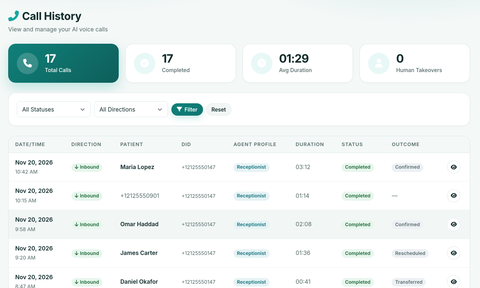
Call history of a demo practice. Every call has a page with its summary and transcript.
On the phone
What your receptionist can do during a call
Answer and recognise
Greets callers with your business name and the greeting you write. A known number brings up the caller's file, their upcoming appointments and the family members on it.
Book, move, cancel
Checks real availability, offers times, and books in the right calendar with the right length. Moves and cancels only the caller's own appointments, or those of their family. Try a booking by phone.
Handle urgent calls
For what you define as an emergency, it offers the slots you keep free for that, or puts the caller through to your emergency line first.
Put callers through
When a caller asks for someone, it transfers to the destination you named: the front desk, a practitioner, a mobile number. If nobody answers, it takes a message.
Take messages
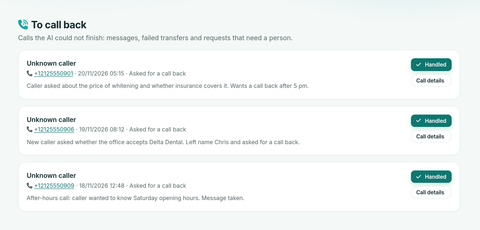
Outside hours or when nobody is free, it notes who called, the number to call back and what they need, and adds it to your call-back list.
Confirm by text
After a booking, the caller gets a text with the time. They reply C to confirm or X to cancel, and the calendar follows.
After the call
Everything written down
- A summary of each call in two or three sentences, on the call page and by e-mail if you choose.
- The full transcript, line by line, with times.
- The outcome: confirmed, moved, cancelled, transferred, or to call back.
- Your contacts kept up to date with each caller, their numbers and family members. Import or export them as CSV.
Your rules
What you set up, once
Most of it is ready from a template for your trade. You adjust it with us during setup, and change it any time.
| Setting | What it controls |
|---|---|
| Greeting, voice and instructions | How the receptionist introduces your business and what it should know: services, prices you want shared, parking, insurance questions. |
| Language | The language your receptionist speaks: English, Spanish, French, German, Italian, Portuguese, Dutch or Arabic. One per receptionist. |
| Opening hours | Day by day, with breaks, public holidays and your own closures. |
| Calendars and appointment types | One calendar per person or resource; each type with its length. |
| Emergency slots | Times kept free for urgent callers only, and what counts as urgent. |
| Transfers | Who to put callers through to, in which order, and your emergency line. |
| Team | Who in your team can sign in, with roles, and two-step sign-in. |
Your phone line
Keep your number
We give your receptionist a local number. You forward your usual business number to it: all the time, when you do not answer, or when your line is busy, depending on what your carrier offers. Your callers keep dialling the number they know.
Setup call
We go through your services, hours and transfers and prepare your receptionist.
Test it yourself
Call it, book, move and cancel, ask for a person. Adjust what you want.
Turn on forwarding
From your phone or your carrier, with the codes we give you. You can turn it off the same way.
Hear it before you decide
Call our test line and talk to a receptionist for a fictional dental clinic, agency, plumber or salon.